
Hosting by PHPHost.ch


Mail setup
Most recent mail clients (Thunderbird, etc.) set themselves up automatically: just enter your e-mail address and your password.
Example with Thunderbird
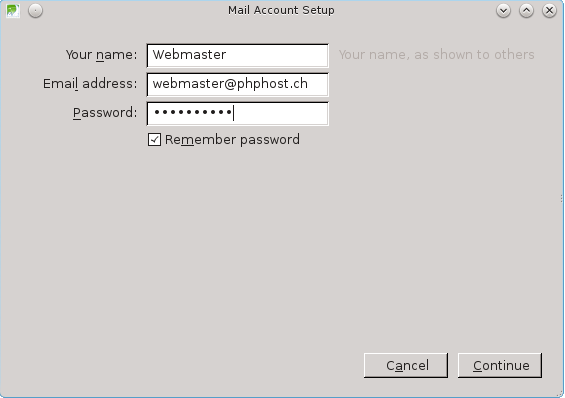
1. Enter your name, your e-mail address and your password, then click Continue.
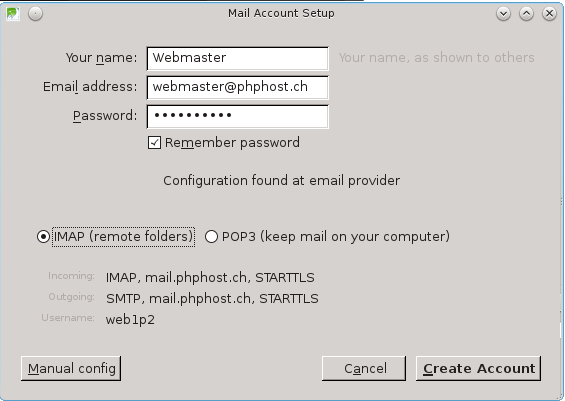
2. Thunderbird automatically finds the PHPHost.ch settings. Choose IMAP (recommended) or POP3, then click Done.
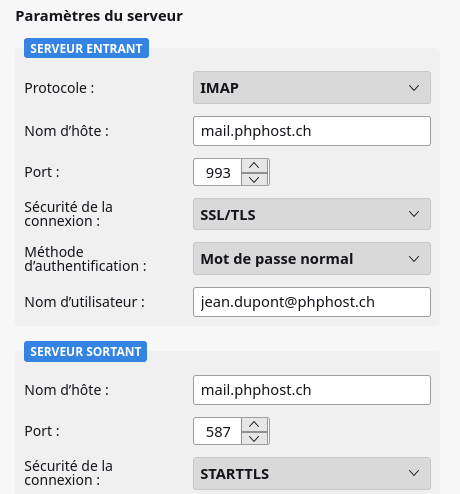
If needed, Configure manually shows the settings in detail:
Phones, tablets and Mac
See the pages iPhone, iPad and Mac (configuration profile to download) and Android.
For a manual setup, use the settings below. The server is always mail.phphost.ch, whatever the domain of your e-mail address. Unencrypted connections are not accepted.
Incoming mail
IMAP (recommended, messages stay on the server)
IMAP - port 993
Host name: mail.phphost.chPort: 993
Connection security: SSL/TLS
Authentication: normal password
Username: your full e-mail address
IMAP - port 143
Host name: mail.phphost.chPort: 143
Connection security: STARTTLS
Authentication: normal password
Username: your full e-mail address
POP3 (messages are downloaded to your computer)
POP3 - port 995
Host name: mail.phphost.chPort: 995
Connection security: SSL/TLS
Authentication: normal password
Username: your full e-mail address
POP3 - port 110
Host name: mail.phphost.chPort: 110
Connection security: STARTTLS
Authentication: normal password
Username: your full e-mail address
Outgoing mail
SMTP
SMTP - port 587
Host name: mail.phphost.chPort: 587
Connection security: STARTTLS
Authentication: normal password
Username: your full e-mail address
SMTP - port 465
Host name: mail.phphost.chPort: 465
Connection security: SSL/TLS
Authentication: normal password
Username: your full e-mail address